OpenAI and Trellix ePO integration
Save yourself the work of writing custom integrations for OpenAI and Trellix ePO and use n8n instead. Build adaptable and scalable AI, workflows that work with your technology stack. All within a building experience you will love.






How to connect OpenAI and Trellix ePO
Create a new workflow and add the first step
In n8n, click the "Add workflow" button in the Workflows tab to create a new workflow. Add the starting point – a trigger on when your workflow should run: an app event, a schedule, a webhook call, another workflow, an AI chat, or a manual trigger. Sometimes, the HTTP Request node might already serve as your starting point.

Popular ways to use the OpenAI and Trellix ePO integration
✨🤖Automate Multi-Platform Social Media Content Creation with AI
Generate AI videos with Google Veo3, save to Google Drive and upload to YouTube
Fully automated AI video generation & multi-platform publishing
AI-powered WhatsApp chatbot for text, voice, images, and PDF with RAG
Generate AI viral videos with NanoBanana & VEO3, shared on socials via Blotato
AI-powered WhatsApp chatbot 🤖📲 for text, voice, images & PDFs with memory 🧠
Clone viral TikToks with AI avatars & auto-post to 9 platforms using Perplexity & Blotato
AI-powered short-form video generator with OpenAI, Flux, Kling, and ElevenLabs
AI-powered multi-social media post automation: Google Trends & Perplexity AI
Generate Instagram content from top trends with AI image generation
Write a WordPress post with AI (starting from a few keywords)
Automated stock analysis reports with technical & news sentiment using GPT-4o
🔍🛠️Generate SEO-optimized WordPress content with AI powered perplexity research
Auto-create TikTok videos with VEED.io AI avatars, ElevenLabs & GPT-4
Hacker News to video content
Automate SEO-Optimized WordPress posts with AI & Google Sheets
🤖 Telegram messaging agent for text/audio/images
Ultimate scraper workflow for n8n
AI-powered stock analysis assistant with Telegram, Claude & GPT-4O Vision
AI marketing report (Google Analytics & Ads, Meta Ads), sent via email/Telegram
Upload to Instagram, TikTok & YouTube from Google Drive
🤖 AI content generation for auto service 🚘 automate your social media📲!
Automate content generator for WordPress with DeepSeek R1
Dynamically generate a webpage from user request using OpenAI structured output
Publish WordPress posts to social media X, Facebook, LinkedIn, Instagram with AI
HR & IT helpdesk chatbot with audio transcription
Automated content generation & publishing - Wordpress
AI voice chat using webhook, Memory Manager, OpenAI, Google Gemini & ElevenLabs
Automated YouTube video scheduling & AI metadata generation 🎬
Auto-generate SEO blog posts with Perplexity, GPT, Leonardo & WordPress
Generate Funny AI Videos with Sora 2 and Auto-Publish to TikTok
Content farming - : AI-powered blog automation for WordPress
Build custom workflows automatically with GPT-4o, RAG, and web search
Create AI viral videos using NanoBanana 2 PRO & VEO3.1 and publish via Blotato
Search LinkedIn companies, score with AI and add them to Google Sheet CRM
AI-powered stock market summary bot
Auto-create and publish AI social videos with Telegram, GPT-4 and Blotato
AI Telegram bot agent: smart assistant & content summarizer
Create low-cost AI videos with Veo3 fast and upload to YouTube & TikTok
Daily news digest: summarize RSS feeds with OpenAI and deliver to WhatsApp
Generate & enrich LinkedIn leads with Apollo.io, LinkedIn API, Mail.so & GPT-3.5
Technical stock analysis with Telegram, Airtable and a GPT-powered AI agent
Automate lead qualification with RetellAI Phone Agent, OpenAI GPT & Google Sheet
AI Timesheet Generator with Gmail, Calendar & GitHub to Google Sheets
Auto-generate and post Instagram reels with Veo3, OpenAI, and Blotato
Automate LinkedIn Outreach with Notion and OpenAI
One-click YouTube shorts generator with Leonardo AI, GPT and ElevenLabs
Extract trends, auto-generate social content with AI, Reddit, Google & post
🎬 YouTube shorts automation tool 🚀
Convert image files (JPG, PNG) to URLs and reduce file size for FREE
Automate AI video creation & multi-platform publishing with GPT-4, Veo 3.1 & Blotato
Compose reply draft in Gmail with OpenAI assistant
Generate and publish carousels for TikTok and Instagram with GPT-Image-1
Generate & auto-post social videos to multiple platforms with GPT-4 and Kling AI
AI agent for realtime insights on meetings
Ai-powered social media amplifier
Automated HR Service System with WhatsApp, GPT-4 Classification & Google Workspace
🚀 TikTok video automation tool ✨ – highly optimized with OpenAI & Replicate
From Google Drive to Instagram, TikTok & YouTube with AI descriptions & Airtable tracking
Lead generation automate on LinkedIn - personalisation, enrichment
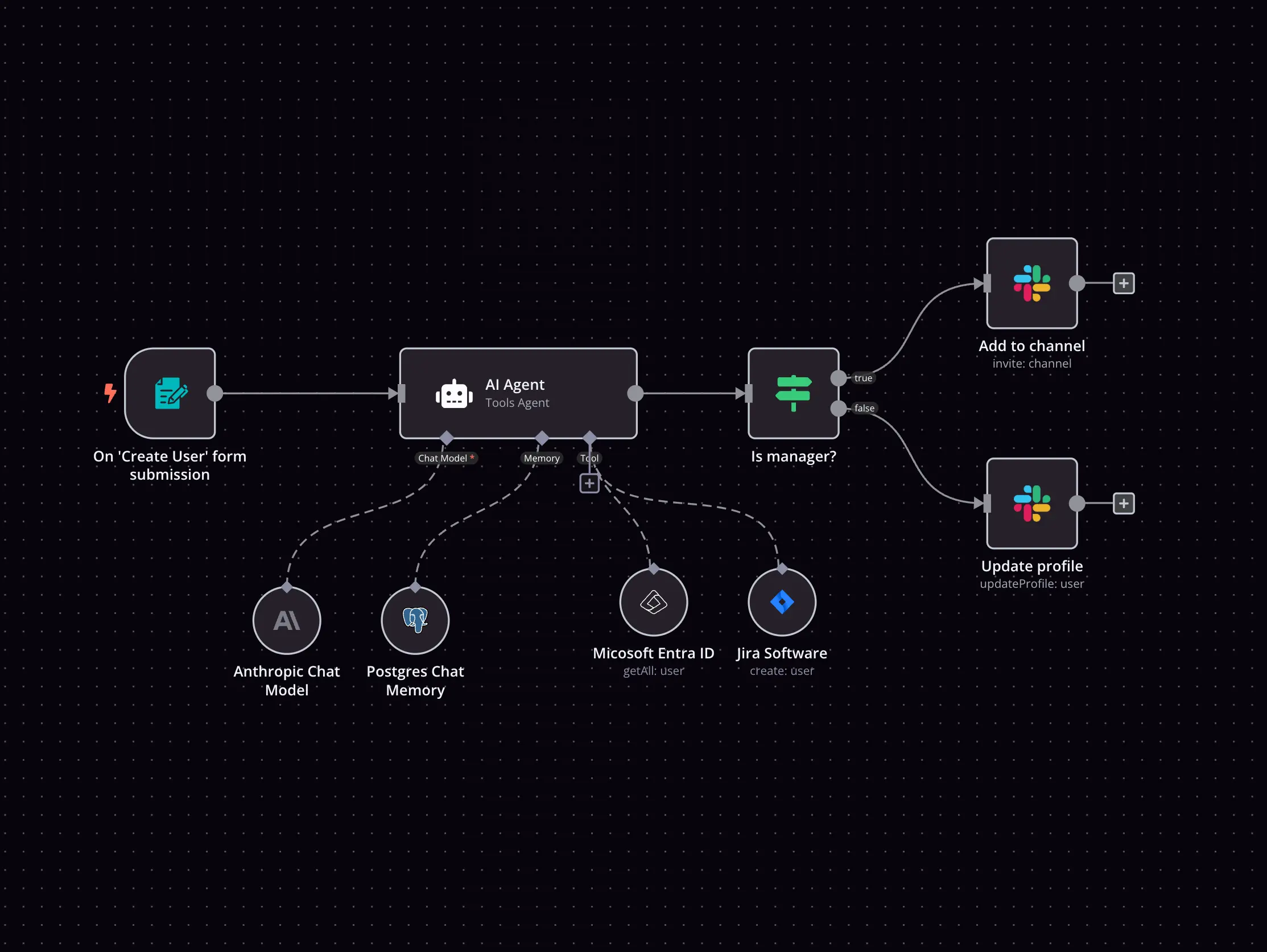
Explore n8n nodes in a visual reference library
Automate YouTube uploads with AI-generated metadata from Google Drive
Automate social media content with AI for Instagram, Facebook, LinkedIn & X
Automate & publish video ad campaigns with NanoBanana, Seedream, GPT-4o, Veo 3
Create social media content from Telegram with AI
Scrape Google Maps business leads with Apify & GPT-4 email extraction
Generate & publish SEO-optimized WordPress blog posts with AI
AI personal assistant for Google Tasks
Create viral ads with AI: NanoBanana & publish on socials via upload-post
Effortless job hunting: Let this automation find your next role
Automate Instagram content discovery & repurposing w/ Apify, GPT-4o & Perplexity
Create a multi-modal Telegram support bot with GPT-4 and Supabase RAG
Automate hyper-personalized email outreach with AI, Gmail & Google Sheets
Share YouTube videos with AI summaries on Discord
Narrating over a video using multimodal AI
Automate sales for digital products & SaaS with AI (GPT-4o)
Turn Google Sheets ideas into AI videos with GPT-4o and Fal.AI Veo 3
Stock market technical analysis with GPT-4o and TradingView for Telegram
Generate 9:16 images from content and brand guidelines
Automate PDF image extraction & analysis with GPT-4o and Google Drive
Analyze & sort suspicious email contents with ChatGPT
AI-powered lead generation system with email personalization and LinkedIn
Generate trend-based marketing videos with Seedance AI, Perplexity, and GPT
Generate UGC marketing videos for eCommerce with Sora 2 and Gemini
🤖 AI restaurant assistant for WhatsApp, Instagram & Messenger
Multi-agent SEO optimized blog writing system with hyperlinks for E-Commmerce
AI sales agent: WhatsApp, FB, IG, OpenAI, Airtable, Supabase auto-booking
Auto-generate WhatsApp proposals from voice or text using GPT & APITemplate
AI-powered YouTube shorts automation: Create & publish with OpenAI & ElevenLabs
Find Content Gaps in Competitors' Websites with InfraNodus GraphRAG for SEO
🐶 AI agent for PetShop appointments (Agente de IA para agendamentos de PetShop)
Find and email ANYONE on LinkedIn with OpenAI, Hunter & Gmail
Redesign t-shirt mockups to print-ready files with GPT-4 vision & Imagen 4
Restaurant order & delivery system for WhatsApp with GPT-4o and Supabase
Automated generation of AI advertising photos for product marketing
Generating AI videos with VEO3 and distributing with Blotato across multiple platforms
Enrich property inventory survey with image recognition and AI agent
Ultimate content generator for WordPress
Auto-create podcast from YouTube transcript using Dumpling AI and GPT-4o
Automate SEO blog creation + social media with GPT-4, Perplexity and WordPress
Speed Up Social Media Banners With BannerBear.com
Automate salon appointment management with WhatsApp, GPT & Google Calendar
Arxiv paper summarization with ChatGPT
Scrape Google Maps leads (email, phone, website) using Apify + GPT + Airtable
Transcribe YouTube videos with AI enhancement via chat interface
Create LinkedIn contributions with AI and notify users on Slack
WordPress auto-blogging pro - content automation machine for SEO topics
Multi-platform AI sales agent with RAG, CRM logging & appointment booking
Travel AI agent - AI-powered travel planner
AI-powered cold call machine with LinkedIn, OpenAI & Sales Navigator
🤖 AI-powered WhatsApp assistant for restaurants & delivery automation
Generate ad image variations using GPT-4, Dumpling AI & Google Drive
Create comedic marketing reels with Sora2, OpenAI & auto-post to social media
AI agent: Find the right LinkedIn profiles in seconds
Extract insights & analyse YouTube comments via AI agent chat
AI real estate agent: end-to-end ops automation (web, data, voice)
Generate Instagram reels with Veo3 and GPT for AI-powered ad creation
Analyze suspicious email contents with ChatGPT Vision
AI premium proposal generator with OpenAI, Google Slides & PandaDoc
AI newsletter builder: Crawl sites with Dumpling AI, summarize with GPT-4o
Generate short-form clips from YouTube videos with GPT-4o, Grok & Airtable
Automated end-to-end fine-tuning of OpenAI models with Google Drive integration
AI SEO Blog Automation for WordPress with featured images-End-to-End
WordPress auto-blogging pro - with deep research - content automation machine
Smart email outreach sequence – AI-powered & customizable
Automate screenshots with URLbox & analyze them with AI
AI Facebook ad spy tool with Apify, OpenAI, Gemini & Google Sheets
Generate UGC ads from Google Sheets with Fal.ai models (nano-banana, WAN2.2, Veo3)
AI-generated weather analysis with NWS alerts, radar imagery, and Home Assistant
Automate LinkedIn candidates sourcing with Google X-ray Boolean search
Auto-create & post social media reels with Google Veo-3 AI and GPT
Generate horror faceless shorts with OpenAI TTS, Replicate Video, and YouTube upload
Generating SEO-optimized product descriptions for Shopify and Google Shopping using AI
Generate cheap viral AI videos to TikTok with Google Veo3 fast and Postiz
AI-driven inventory management with OpenAI forecasting & ERP integration
Smart stock trading recommendations with GPT-4, TwelveData & NewsAPI analysis
Generate UGC promo videos with OpenAI, Sora 2 and Blotato for eCommerce
Make OpenAI citation for file retrieval RAG
Auto-generate SEO articles in WordPress with Gemini AI and OpenAI images
Automate travel agent outreach with web scraping, OpenAI, and Google Sheets
Scrape competitor reviews & generate ad creatives with Bright Data & OpenAI
Generate AI videos with Sora2 Pro, save to Google Drive and upload to YouTube
Automated blog post generation with GPT-4 and publishing to Ghost CMS
Facebook Messenger Bot with GPT-4 for Text, Image & Voice Processing
AI proposal generator
Lead research report emails
Transform images into AI videos with MiniMax Hailuo 02. Upload to YouTube/TikTok
Content generator for WordPress v3
AI content creation and publishing engine with Mistral, Creatomate, and YouTube
Generate AI avatar videos with GPT-5 & publish to social media platforms
Generate trend-based video marketing ideas with GPT-4, Tavily and Veo 3
Cold email icebreaker generator with Apify, GPT-4 & website scraping
Convert YouTube videos into SEO blog posts with GPT-4o, Dumpling AI, and Flux
Domain outbound : automate lead extraction, and targeted outreach
Connect AI to any chats in Kommo
Analyse papers from Hugging Face with AI and store them in Notion
Optimize & update Printify title and description workflow
Create e-mail responses with Fastmail and OpenAI
Automate Instagram carousel creation with GPT-5, Nano Banana, and Blotato
Create AI product images and marketing videos with NanoBanana Pro, Veo 3.1 and Blotato
Daily business news briefings with NewsAPI & GPT-4 insights to Slack
Personalized LinkedIn connection requests with Apollo, GPT-4, Apify & PhantomBuster
Create daily Israeli economic newsletter using RSS and GPT-4o
Daily swing trade ideas with GPT-4, Yahoo Finance, Google Sheets & Telegram
Automate crypto news posting to X & Telegram with AI summarization
Generate & schedule social media content with GPT-4 and Buffer from Google Sheets
🏛️ Daily US Congress members stock trades report via Firecrawl + OpenAI + Gmail
Manage emails via WhatsApp with Gmail, GPT and voice recognition
Automated cryptocurrency trading bot with ICT methodology, GPT-4o & Coinbase
Automate lead generation & personalized outreach with Apollo, AI, and Instantly.ai
Deep research agent - automated research & Notion report builder
Obsidian notes read aloud using AI: available as a podcast feed
Transform press releases (PDF & Word) into polished articles with Gmail & OpenAI
Create AI generated videos 4x cheaper than veo3 with Google Sheets & Fal.AI
Convert Reddit threads into short vertical videos with AI
Create viral social media videos with FalAI Flux/Kling and GPT-4 automation
Create & approve POV videos with AI, ElevenLabs & multi-posting (TikTok/IG/YT)
AI-generated summary block for WordPress posts
Multi-platform social media publisher with Blotato, GPT-4 Mini & Airtable
Automated invoice processing system with OCR & AI - AP automation with Airtable
LINE assistant with Google Calendar and Gmail integration
Create AI-generated UGC marketing videos with Telegram & GPT-4
Generate AI songs + music videos using Suno API, Flux, Runway and Creatomate
Create AI-generated books with GPT-4.1-mini, DALL-E, Google Drive and AWS S3
Generate AI videos from Telegram messages with Nano Banana & Veo-3
Auto-Generate & Approve Social Media Posts from RSS Feeds with OpenAI & Telegram
Create AI news video content ideas for social media with Perplexity & OpenAI
Automate WhatsApp customer support with voice transcription, FAQ & appointment scheduling
Automate video creation from voice input with HeyGen, GPT-5 & social publishing
🐶 AI Petshop Assistant with GPT-4o, Google Calendar & WhatsApp/Instagram/FB
WordPress blog automation: AI SEO content, images, scheduling & email alerts
Competitive ad research & image generator with Apify, GPT-4o & Facebook Ad Library
LinkedIn lead generation with GPT-4o, Apify scraping, and automated outreach
Automate YouTube thumbnail creation & social publishing with Templated.io & Blotato
Discover & enrich decision-makers with Apollo and human verification
Automated social media content creation with OpenAI, LinkedIn & Twitter approval
Multi-agent healthcare assistant with WhatsApp, GPT-4 & Google Sheets
Personalized outreach for lawyers with LinkedIn scraping, GPT-4o, Google Sheets
Turn YouTube transcripts into newsletter drafts using Dumpling AI + GPT-4o
Automate VIRAL Youtube titles & thumbnails creation (FLUX.1 + Apify)
Generate VEED AI talking head videos from sheet rows with OpenAI or ElevenLabs
Shopify multi-module automation with GPT-4o, Langchain agents & integrations
Send multi-city weather forecasts with AI-enhanced formatting from OpenWeatherMap to Gmail
AI icebreaker builder: scrape sites with Dumpling AI and save to Airtable
Enrich Pipedrive's Organization Data with OpenAI GPT-4o & Notify it in Slack
Process receipt images with GPT-4o-mini, WhatsApp & Google Sheets automation
Classify new bugs in Linear with OpenAI's GPT-4 and move them to the right team
Automate job applications with AI resume tailoring using GPT-4o, LinkedIn & Gmail
Auto-generate WordPress blog posts from Reddit RSS with Groq AI & Pexels images
AI-powered LinkedIn content engine (n8n + OpenAI + Perplexity + Replicate)
🧑🦯Improve your website accessibility with GPT-4o and Google Sheet
Automate LinkedIn profile search & cold email outreach with OpenAI and Hunter
Convert newsletters into AI podcasts with GPT-4o Mini and ElevenLabs
Generate multiple languange blogpost with OpenAI, support Yoast & Polylang
Collect LinkedIn profiles with AI processing using SerpAPI, OpenAI, and NocoDB
Create and schedule LinkedIn posts from Google Sheets with Gemini and DALL·E
Generate SEO blog posts from Google Trends to WordPress with GPT & Perplexity AI
Transform image to Lego style using line and Dall-E
Automate RSS content to blog posts with GPT-4o, WordPress & LinkedIn publishing
YouTube thumbnail generator with OpenAI & Apify
Generate YouTube SEO content & thumbnail from video scripts with GPT-4o & Runway
Crawl websites & answer questions with GPT-5 nano and Google Sheets
Automate UGC video creation with Sora 2, OpenAI, and Gemini
Automated Gmail reply drafts with OpenAI assistant for labeled emails
Automatically document and backup N8N workflows
Create & Publish Instagram Carousel Posts with GPT-4.1-mini, Imgur & Graph API
Create & auto-post Instagram reels with AI clones: Script-to-post (Heygen + Submagic + Blotato)
Auto-generate & post social media content with GPT-4, Notion & Instagram API
Flexible currency rate uploads for SAP B1 with AI validation & multiple sources
Smart job search: resume scoring & tailoring with OpenAI, Apify, and Airtable
Automate lead generation with Apollo, AI scoring and Brevo email outreach
Generate scalable e-commerce product images with GPT-4 and NanoBanana Pro
Jobs newsletter automation system (N8N, Bolt.new, RapidAPI, Mails.so & ChatGPT)
Generate SEO-optimized WordPress blogs with Gemini, Tavily & human review
Automatically copy & translate Telegram channel content with GPT-4o-mini
WordPress content automation machine with HUMAN-IN-THE-LOOP & DEEP RESEARCH
Automate personalized cold emails with Apollo lead scraping and GPT-4.1
Generate viral CCTV animal videos using GPT and Veo3 AI for TikTok
Auto-generate blog & AI image from YouTube videos with Dumpling AI & GPT-4o
One telegram chat to edit, thumbnail & auto-post your videos everywhere
Create authentic UGC video ads with GPT-4o, ElevenLabs & WaveSpeed lip-sync
Generate Shopify product listings from images with Gemini AI and Airtable
WhatsApp customer support with Claude AI, Google Docs & multilingual capabilities
Send daily translated Calvin and Hobbes comics to Discord
Real estate cold call scripts for price reduced FSBO properties (Zillow data)
Convert Form Inputs to Cinematic Videos with GPT-4, Dumpling AI & ElevenLabs Audio
Subdomain enumeration with Subfinder, HTTPX & GPT-4-Mini for security reconnaissance
Automate multi-modal appointment booking via WhatsApp using GPT-4 and Cal.com
Generate personalized icebreakers
Automated website audit & personalized outreach with Lighthouse and GPT-4
Auto-generate platform-optimized social media posts from WordPress with Claude & Postiz
Automatically reply to cold emails with GPT-4 & Instantly.ai
Assistant for Hubspot chat using OpenAi and Airtable
Turns Reddit Pain Points into Comic Ads using Dumpling AI and GPT-4o
WhatsApp-to-social-media content generation with GPT-4 & approval workflow
Build a multi-functional Telegram bot with Gemini, RAG PDF search & Google Suite
Automate AI phone booking & CRM updates with GPT-4, VAPI.ai, and GHL
Create AI news videos with HeyGen avatars and auto-post to social media
Workflow to summary group Whatsapp
Transcribe YouTube videos & create GEO summaries with Whisper and GPT-4o-mini in Notion
AI blog post generator with scheduled or prompt-based content for WordPress
Generate personalized cold outreach emails with Apify, OpenAI, and Google Sheets
Generate UGC videos from product images with GPT-4, Fal.ai & KIE.ai via Telegram
🌳 EU green legislation tracker with GPT-4o, Google Sheets and Tasks
Automated AI product photography and Instagram post generator (Deepseek/Segmind)
Find leads on Google Maps and reach out automatically (GPT-4 + Airtable + Gmail)
E-commerce product fine-tuning with Bright Data and OpenAI
Respond to inbound leads with personalized videos using Heygen AI and GPT-4
Auto-generate social media posts from URLs with AI, Telegram & multi-platform posting
Automated LinkedIn lead generation & DM outreach with Airtable, and Unipile.
Find B2B decision maker emails & build lead database with Serper.dev & AnyMailFinder
💅 AI Agents Generate Content & Automate Posting for Beauty Salon Social Media 📲
Auto-publish content to 9 social platforms with Blotato & Airtable
Transform YouTube videos to social media content with Vizard AI and GPT-4.1
Generate and post viral memes to Instagram with MagicHour AI and GPT-4
AI-driven competitor & market intelligence with GPT 4 & Apify
Log food calories from images to Google Sheets using LINE and OpenAI Vision
Extract & store receipt data with GPT-4, OCR, Google Sheets & Notion via Telegram Bot
Write personalised direct messages for Instagram with Apify, OpenAI, GSheets
Transform videos with FAL AI avatar swaps & voice and publish to TikTok with Blotato
Automated blog post generator with GPT-4, DALL-E, and Wikipedia for WordPress
Create & post viral news AI avatar videos to 9 platforms with Perplexity & HeyGen
Daily auto-generated tweets from trending topics using Perplexity & GPT-4o
Generate AI stock reports w/ fundamental, technical, & news analysis (Free APIs)
Two-stage document retrieval chatbot with OpenAI and Supabase vector search
Generate frozen ASMR product videos with Gemini, Veo3, GPT-4o and post to YouTube, TikTok, Instagram and Pinterest
Transform resumes into AI-generated personal video intros with HeyGen & GPT
AI recruiting pipeline: Job to candidate shortlist with Apollo & Airtable
Automatic job listings extraction and publishing template
Document Q&A system with Voyage-Context-3 embeddings and MongoDB Atlas
Evaluation metric example: String similarity
Automate invoice processing with OCR, GPT-4 & Salesforce opportunity creation
OpenAI models template: GPT-4 and DALL-E services overview
Summarize news articles & auto-post to social media with GPT-4 and GetLate
Create talking avatar videos with Elevenlabs & Infinitalk and auto-post to TikTok
AI Shopify product descriptions: GPT-4o Vision + Claude + Analytics
Generate blog posts from keywords to Webflow
Create e-commerce promotional carousels with Gemini 2.5 & social publishing
Transform meeting notes into tasks using GPT-4.1-mini, Notion & TickTick via Telegram
Nano Banana/Gemini 2.5 Telegram bot with multi-modal functionality
Create short-form AI videos for any topic using OpenAI, Veo 3 & Gmail
Automate stock trades with AI-driven technical analysis & Alpaca Trading
Repurpose YouTube videos and publish via Blotato with Telegram, Sheets and GPT-4.1-mini
Extract email tasks with Gmail, ChatGPT-4o and Supabase
Ai-powered chart generation from web data with GPT-4o and WordPress upload
AI job relevancy scorer: Search LinkedIn Jobs with GPT-4o-mini & Google Sheets
Automated lead qualification voice agent with OpenAI GPT, Twilio, Elevenlabs and Gmail
Automate LinkedIn comment replies with GPT-3.5 & track in Google Sheets
Automated music video creation & YouTube publishing with AI-generated metadata from Google Drive
Generate creative ADV images from references with Seedream v4 for Instagram & Facebook
Venafi Cloud Slack cert bot
Transcribe long audio files beyond 25MB limit with FileFlows and OpenAI Whisper
Generate 100+ ad variations from one image with Fal.AI Nano Banana and GPT-5
Create viral videos from reference images with VIDU & upload to YouTube/TikTok
Telegram interior design studio with furniture cataloging & Gemini AI design generation
Digest new YouTube videos to Slack with Google Sheets, RapidAPI & GPT-4o-mini
🌍 AI interpreter and translator for WhatsApp – translate voice & text
Analyze competitor Facebook ads with AI (GPT-4 & Gemini) & email reports
Product marketing assets generator with VEO 3, OpenAI & Airtable
Automated lead generation & qualification with Google Maps, GPT-4 & HubSpot
Personalized thank-you emails with website scraping, GPT-4o, and Gmail
Generate and Publish SEO-Optimized Blog Posts to WordPress
Jarvis: AI personal assistant with multi-agent network via WhatsApp
Analyze blog SEO with AI: complete assessment using GPT-4 and ethical scraping
Create consulting client onboarding tasks with GPT-4, Google Sheets and Slack
Automate job search and matching with Adzuna API, GPT-3.5, and Google Sheets
Create AI-powered SEO audit reports with DataForSEO and Claude
Send YouTube video summaries to Obsidian via Dropbox
Generate authentic product reviews with OpenAI for WooCommerce
Generate & auto-post tech news AI avatar videos to social media with Heygen and Blotato
Command-based Telegram bot for article summarization & image prompts with OpenAI
Generate personalized cold email icebreakers with GPT-4 Mini, Apify & LinkedIn
WhatsApp AI assistant with Claude & GPT4O: multi-format processing & productivity suite
Automate product ad creation with Telegram, Fal.AI & Facebook posting
Automate RSS-to-social media with AI summaries and image generation
Ai voice & text note-taking with LINE Messaging, Supabase Vector DB & Gmail
Analyze and summarize Google Reviews with SerpAPI, GPT-4 and Google Sheets
Auto-generate Instagram, Facebook & LinkedIn posts from YouTube videos with GPT-4o & Dumpling AI
Create a WhatsApp chatbot with GPT-4o, Whisper transcription and Redis buffer
Weekly Facebook ads performance reports with AI-powered analysis & Gmail delivery
Automated daily AI summaries from WhatsApp groups
Create viral storytelling videos with GPT, Gemini & JsonCut from text prompts
Restaurant GPT-4 receptionist for bookings & delivery using Vapi, Telegram, Airtable
Automatic blog post generation from WooCommerce products with GPT-4.1-mini
Translate RSS feed content to Hindi and publish to WordPress with OpenAI
Auto-reply to Google Play Store reviews with GPT-4o & sentiment analysis
Automate print-on-demand: design to Shopify with AI, mockups & social promotion
LinkedIn talent pipeline: AI-powered candidate search & ranking with GPT-4o
Multi-platform video publishing from Google Sheets to 9 social networks via Blotato API
Automate SEO reporting with Google Search Console, GA4, and Google Sheets
Create viral YouTube content from Reddit posts with GPT-4o and Google Sheets
Voice AI chatbot with OpenAI, RAG (Qdrant) & Guardrails for WordPress
Create & share lip-synced avatar videos with Infinitalk AI & upload to TikTok/YouTube
WhatsApp support bot with Google Drive RAG, GPT-4.1-mini and Cohere reranking
Cold email icebreakers from local business search with GPT-4 and Dumpling AI
Automate AI news videos with GPT-4o, Heygen Avatars, and Blotato
Voice-to-task manager with Telegram, GPT-4o & Notion database
AI-personalized multi-product email outreach with SMTP rotation (GPT-4o/o3-mini)
Automated product ad image creation with OpenAI, Gemini & Google Workspace
Create AI-generated music playlists for YouTube using Suno, GPT-4, Runway & Creatomate
Automate social media content creation & publishing with AI & human approval flow
Automate lead gen & email outreach with Apify, Apollo.io, GPT-4 & Google Sheets
AI-powered receipt and expense tracker with Telegram, Google Sheets & OpenAI
Process voice, images & documents with GPT-4o, MongoDB & Gmail tools
Ai-powered email triage & auto-response system with OpenAI agents & Gmail
Automated Hugging Face paper summary fetching & categorization workflow
Generate YouTube content ideas from video analysis with Dumpling AI and GPT-4o
Extract seed-funded startup data with RSS, GPT-4.1-MINI & BrightData to Excel
Generate articles from Google Sheets to WordPress with web scraping and GPT-4 Mini
AI competitor review analyzer with Dumpling AI + GPT-4o + Google Sheets
Generate SEO Arabic articles and save to Notion
Daily insight email from Structured Web Data with Firecrawl
Create AI-powered YouTube shorts with OpenAI, ElevenLabs, 0CodeKit!
LinkedIn Lead Enrichment & Personalized Cold Outreach with Hunter.io, GPT-4 & Sheets
Research & generate blog posts from keywords with Dumpling AI and GPT-4 to WordPress
Automate Instagram comment replies with OpenAI and Redis tracking
Generate & deploy landing pages with GPT, Gemini and Vercel
AI-powered YouTube meta generator with GPT-4o, Gemini & content enrichment
Find the best favicon from multiple sources with GPT-4 vision analysis
Bulk AI Image Generator, Rename Engine & 4× Upscaler
Generate personalized cold emails with Anthropic, GPT-4 & Google Sheets
Create and post social media image captions with GPT-4.1-mini and Google Sheets
Turn YouTube RSS videos into social posts with Dumpling AI and Airtable
Create personalized email outreach with AI, Telegram bot & website scraping
Book beauty appointments and answer FAQs with GPT-4, Google Calendar, Gmail, and Instagram
Facebook ads competitive analysis using Gemini and Open AI
Turn YouTube comments into content ideas with GPT-4.1-mini, Tavily & Apify
AI-powered lead scoring with Salesforce, GPT-4o, and Slack with data masking
Generate personalized cold outreach icebreakers with GPT-4 and Google Sheets
Automate blog & LinkedIn content creation with OpenAI & Replicate AI images
Automated job extraction & publishing with RAG, Jina AI and OpenAI to WordPress
Hostinger form lead capture & qualification with OpenAI, Beehiiv & Google Sheets
Multi-agent personal assistant orchestration with GPT-4o & WhatsApp
Personalized LinkedIn outreach with GPT-4O, PhantomBuster & Google Sheets
Send organized security CVE digests from NVD with AI-polished summaries to Gmail
📊 AI token tracker for WhatsApp & Telegram – Save AI usage to Google Sheets
Auto-generate problem-focused blog posts for Shopify products with AI
Multimodal Slack AI assistant with voice, image & video processing
Analyze trending YouTube videos with Apify, OpenAI, and Google Sheets
Generate accessible alt text with AI from Google Sheets to WordPress
Auto-generate blog posts with GPT, Leonardo AI, and Wordpress publishing
Generate and publish SEO-optimized blog posts to Blogger with OpenAI & DALL-E
Multilingual RSS to WordPress publishing with OpenAI, ACF, and AI-generated images
Auto-generate AI news commentary with Dumpling AI and GPT-4o
Automated YouTube publishing from Drive with GPT & Gemini metadata generation
Auto-detect actionable emails with OpenAI & get alert message on Teams via flow
Multi-channel campaign messaging with GPT-4 and Salesforce
Automate viral content creation with OpenAI, ElevenLabs, and Fal.ai for videos, podcasts, and ASMR
Multilingual WhatsApp translator with OpenAI Whisper & GPT-4 and HubSpot integration
Generate & publish AI news avatar videos with HeyGen and Blotato
Turn text into cinematic videos using GPT-4, Dumpling FLUX.1 Pro, and Veo 3
Personalized sales outreach with Apollo, GPT, and Gmail automation
Automate blog engagement with GPT-5 generated comments for WordPress
Generate domain insights with WHOIS lookup and GPT-5-Nano via RapidAPI
News-to-blog automation with GPT, Leonardo AI & WordPress publishing
Generate UGC-style AI videos with Google Sheets, NanoBanana Pro and Veo 3.1
Extract product info from webpage screenshots using Dumpling AI and GPT-4o
Auto-generate SEO product titles & descriptions with GPT-4o-mini for Printify
Video to blog research automation with GPT-4o, Dumpling AI & Google Sheets
Automated email responses with GPT-4O & Supabase conversation memory
Extract and verify book titles from bookshelf photos using GPT-4o and Google Books
Transform cloud documentation into security baselines with OpenAI and GDrive
Generate branded article images with GPT-4o, FAL Flux and Google Drive
Automate Google Meet notes with GPT-4.1-mini, Notion, Slack & Gmail distribution
Auto generate & post LinkedIn content for Amazon sellers with GPT-4o & Apify
Ai-powered restaurant newsletter creator with Mailchimp and Telegram approval
Keep RAG system updated with Google Drive file changes to Supabase vector DB
Automate professional LinkedIn posts with OpenAI GPT, DALL-E and trending topics
Parse CVs from emails with OCR & GPT for Notion database
Daily Competitor Tweet Summarizer with X API, GPT-5-Nano, and Gmail Delivery
Create AI-generated social media posts from RSS feeds with GPT-5 and JsonCut
Automate Shopify Product Posting to Social Media with GPT-4.1-Mini & Data Tracking
Automated image editing with GPT-4 Vision & Gemini for Instagram posts from Airtable
Transcribe & summarize GoHighLevel call recordings
Add AI-generated headings & conclusions to WordPress posts with GPT-4.1
Generate educational social media carousels with GPT-4.1, Templated.io & Google Drive
Audio to executive brief: Transcribe & analyze with AssemblyAI and GPT-4
Automate blog-to-social media with GPT-4 for LinkedIn, X, and Reddit
Repurpose YouTube videos into blogs and social posts with GPT-4o, WordPress, LinkedIn, X and Instagram
Generate captions from autocomplete ideas using Dumpling AI + GPT-4o
Generate WordPress blog posts with GPT-4O and Pixabay featured images via form
Automatically search Facebook ad products on Amazon using Apify scrapers
Automate UniFi controller updates via SSH with Telegram notifications
Generate AI product ad images from Google Sheets using Fal.ai and OpenAI
Auto-generate Facebook posts from video insights using Dumpling AI + GPT-4o
Automate Twitter sentiment analysis with OpenAI, Google Sheets, and Slack alerts
Conversational VK bot with GPT-4 mini & Whisper voice transcription
Generate E-E-A-T SEO blog drafts for WordPress with OpenAI
YouTube video optimization & cross-platform distribution with GPT-4o
Automatically enrich Salesforce accounts with web crawling, LinkedIn data, GPT
Market intelligence engine with AI sentiment detection & competitor analysis
Automate invoice data extraction with OCR.Space, GPT & Google Sheets
Multi-agent salon appointment management with Telegram, GPT5-mini & Claude MCP
Generate blog posts and social media content with GPT-4.1 and Pexels images
Transform viral Instagram Reels into original scripts with AI, Perplexity & Apify
Collect & summarize multilingual news with NewsAPI, OpenAI & Google Sheets
Extract top products from any website with Dumpling AI and GPT-4o
Automate SEO blog post creation and publishing with OpenAI & WordPress
Automate GPT-4o fine-tuning with Google Sheets or Airtable data
Telegram bot: analyze images with GPT-4o-Mini/NVIDIA Vila & generate images with Stable Diffusion 3
Automate lead enrichment with web scraping, GPT-4o, Airtable and Slack notifications
Automating SAP B1 journal entries using JSON, Google Sheets, and GPT-4o
Automate B2B lead generation & personalized cold emails with Apollo, Apify & GPT
Ai-powered lead scoring & personalized responses with JotForm, GPT, and Gmail
Crypto alpha scanner with OpenAI - on-chain and social alerts to Telegram
Handle WhatsApp sales queries with GPT-4, Supabase, and a product catalog
Triage AWS security misconfigurations with GPT-4.1 Mini and send alerts to Gmail
Weekly OKR alignment report with Gmail, Google Calendar, Notion, and GPT-4.1
Create animated baby podcast videos with GPT, DALL-E, ElevenLabs and Hedra
Automate Candidate Screening with LlamaIndex & GPT for Email Responses
AI-powered Instagram content repurposing with OpenAI GPT-4O & Perplexity Research
Resume screening & candidate routing with OpenAI, Jotform, and Google Sheets
Get Colombian peso to USD exchange rate with Telegram bot and AI date recognition
Automate meeting transcription & minutes distribution with OpenAI and Google Drive
Automate LinkedIn post summaries to Slack with AI and Apify
Handle clinic WhatsApp support with GPT-4o-mini, Pinecone RAG and Gmail alerts
Create SEO outlines from top Google results with SerpAPI and GPT-4o
Turn TikTok comments into AI avatar videos with Dumpling AI, GPT-4 & Captions.ai
Automate Telegram channel post reactions with bot rotation & GPT-5-mini
Automate news discovery & publishing with GPT-4, Google Search API & Slack
Transcribe & analyze Telegram voice messages with AssemblyAI & GPT-4.1 to Gmail
Auto-audit SEO traffic drops with AI & Google Search Console to Slack
Automate blog creation from keywords with Dumpling AI, OpenAI, and Google Docs
Qualify insurance leads using Vapi, GPT-4 proposals and Airtable
Enrich CRM Leads with LinkedIn Company Data using GPT-4 and Airtable
Build a Telegram AI assistant with MemMachine, OpenAI, and voice support
Find TikTok video questions from keywords using Dumpling AI + GPT-4
AI sales agent — fully automated email handling & lead scoring system
Voice translator bridge (Telegram → Slack) with GPT-4o-mini + Whisper
Convert news headlines to audio newsletters with Claude, GPT-4o & OpenAI TTS
AI-powered meeting minutes with GPT-4, task assignment & multichannel distribution
Automate image portfolio organization with GPT-4o Vision, Google Drive and Notion
Auto-Translate & Recreate TikTok Carousels with Gemini Vision & Midjourney
Personalize cold emails with LinkedIn data, GPT-4 & Airtable-Instantly
Automate stale deal follow-ups in Salesforce with GPT-5.1, email, Slack & tasks
LinkedIn lead personalization with Google Drive, Apify & AI
WordPress blog generation with AI Research, Image Creation & Auto Publishing
Analyze Customer Reviews from 5 Platforms with Thordata Scraping & GPT-4.1 Reports
Automate video voiceover & subtitles with Whisper, OpenAI TTS & FFmpeg
Automate Bitget spot trading with GPT-4o-mini AI agent via Telegram
Podcast to X (Twitter) pipeline with OpenAI Whisper, GPT-4o & Slack approval
Create AI-curated news digests with GPT-5.1, NewsAPI, Tavily & Telegram
Qualify webhook leads with GPT-4o-mini and create Asana tasks automatically
Generate complete lead magnets with OpenAI, Claude, and Google Docs automation
Automate LinkedIn content creation with OpenAI, Notion, and Google Slides
Create an AI chatbot for WhatsApp with Whapi.Cloud and OpenAI GPT-3.5
Automated SEO blog publishing with WordPress, OpenAI & Perplexity
Generate ideal customer profiles & find lookalike companies in Germany
AI-powered lead generation with Apollo, LinkedIn research & 4-step personalized emails
Automate Reddit Monitoring with GPT-5-Mini, Notion, and Gmail
Find & score LinkedIn leads with GPT-4 AI and export to Google Sheets CRM
Website uptime monitoring with GPT-4 analysis and Gmail notifications
Generate personalized cold email icebreakers from sites with GPT-4 & G-Sheets
Repurpose blog & YouTube content to social media with GPT-5.1 and Google Docs
AI-powered Facebook comment management: Auto-reply, delete, ban & notify
Generate AI-powered competitor analysis reports with GPT-4, Apify & Google Docs
Lead scoring & auto-assignment with GPT-4 and GoHighLevel + Slack alerts
AI news digest: Summarize top stories with GPT-4o and DALL-E for Telegram
Automated Blog Creation & Multi-Platform Publishing with GPT/Gemini & WordPress
AI-powered stock analysis with Danelfin, TwelveData and Alpha Vantage
Track website changes with Firecrawl, GPT-5-Mini, Notion, and Gmail
Auto-generate sales presentations from Claap calls with GPT-4o and Google Slides
Magento maintenance via natural language with GPT and Telegram/WhatsApp
Smart knowledge base builder — auto-convert websites into AI training data
End-to-end B2B real estate lead enrichment & outreach with Apify, Relevance, OpenAI & Sheets
LinkedIn to Gmail: generate cold emails with Dumpling AI, GPT-4 & Dropcontact
Creating SEO-optimized blogs for WordPress using specific tools
Generate multi-format social visuals with Abyssale and publish via Blotato
Generate email newsletters from Telegram keywords with Dumpling AI and GPT
Automate Instagram posts with GPT-4o captions, ImgBB & Buffer integration
Generate UGC product video ads from a reference image with OpenAI and Kie.ai
Score Upwork jobs and generate proposals with Apify, GPT-4o, Google Sheets and Telegram
Personalized lead response with AI videos using Scout, GPT-4, and HeyGen
Automate personalized lead responses with website scraping, GPT-4o, and Airtable CRM
Qualify & enrich leads with GPT-4 and LinkedIn data for intelligent routing
Automate SEO blog pipeline from keywords to WordPress with GPT-5 & fal.ai images
Transform support tickets into AI documentation with GPT-4, PDFs and Google Drive
Automated POV video creation with AI scripts, visual generation & YouTube
Generate AI video sales letters with Google VEO3, Creatomate captions & Facebook publishing
Qualify TikTok influencers from username with Dumpling AI + GPT-4
Convert websites to audio summaries via WhatsApp using GPT and TTS
Generate personalized cold email icebreakers with GPT-4 from Google Sheets to instantly
Cross-post social content from Google Sheets to 5 platforms with OpenAI images
Automate WordPress SEO optimization with GPT-5 nano + Yoast SEO
Generate personalized email icebreakers with GPT-4.1 and Instantly.ai integration
Daily Solana news tracker with GPT-4.1-mini weekly summaries in Google Sheets
Automate candidate creation in Recrutei with GPT-4 vacancy matching & resume parsing
Manage tasks, email & calendar with GPT-4o personal assistant on Telegram
Create AI-generated meta ad campaigns from product URLs with OpenAI & Firecrawl
Generate ideal customer profile leads & personalized pitches with GPT-4o-mini, Perplexity and Apify
Autonomous blog publishing from YouTube videos with ChatGPT, Sheets, Apify, Pexels & WordPress
Multi-channel customer sentiment tracker with real-time analytics and alerting
Convert websites to Instagram Reels with Gemini Veo, OpenAI TTS, and JsonCut
Process testimonials with GPT-4 & auto-generate social media cards with Google Sheets
Moderate Facebook comments with AI and send reports to Slack & Telegram
Create AI shorts with HeyGen, Creatomate, Replicate, Gemini and OpenAI
Generate personalized sales emails from Google Maps with OpenAI to Google Sheets
Generate comprehensive financial reports with GPT-4 analysis and anomaly detection
Automate Resume Analysis & Candidate Screening with JotForm, Azure OCR, GPT-4.1, Zoho CRM
Automated AI media creation with MagicHour AI and GPT-4 prompt optimization
Create personalized news digests with GPT-5.1, SerpAPI, and Telegram delivery
Slack auto translator (JA ⇄ EN) with GPT-4o-mini
Extract text from PDFs and images in Google Drive and post to WordPress and social media with OpenAI GPT-4.1 and DALL·E
Automated lead capture & AI-personalized audio follow-up with OpenAI & ElevenLabs
Generate personalized deal content recommendations with Zoho CRM, GPT-4o-mini & Gmail
Automated invoice workflow with smart reminders using GPT-4, Stripe, and Google Workspace
Create AI UGC videos from Telegram voice notes using OpenAI & HeyGen
Automated APK security scanning & PDF reporting with MobSF, AI & Google Drive
Automated request-to-quote with OpenAI, Google Sheets & CraftMyPDF
Create a daily market brief from Google Sheets, Alpha Vantage, Reddit, OpenAI, and Slack
Technical SEO audits with GPT-4o-mini & multi-format reporting (Sheets/Email)
Auto summarize YouTube videos to Japanese with GPT-4o-mini & post to Slack
Automate YouTube Content Strategy with AI, Apify & Google Sheets
Score and route new trial leads with Firecrawl, Scrapin.io, OpenAI, Slack and Instantly
PartnerStack/Impact → WooCommerce product creation with GPT-4 & AI images
Create AI-driven social media posts and publish to all major platforms
Convert documents to podcast audio with GPT-4o & OpenAI TTS
Extract & analyze competitor reviews with Firecrawl & GPT-4o mini for intelligence reports
Create e-commerce listings from images with UploadToURL, GPT-4o, Shopify
Create Dev.to articles with OpenAI/Gemini - AI-generated content with images
Transform spreadsheet data into smart charts with OpenAI, QuickChart & Google Drive
Generate Images on Telegram 🤖🖼️ from Text and Voice using Grok Imagine & Kie AI
Influencer brand safety auditor with engagement analysis
Generate daily AI reels from Google Drive images with GPT‑5.1, Wavespeed and Submagic
Publish SEO blogs to WordPress with GPT-4.1, DALL-E, Gemini, and Google Sheets
Send AI sales proposals and Stripe payment links after Calendly calls
Generate professional proposals with GPT-4o and PDFMonkey
Process meeting transcripts into Notion notes & tasks with AI and Google Drive
Generate Instagram news carousels from RSS feeds using GPT-4o
Automated NASA patent lead generation & scoring with OpenAI, Google, and Notion
Analyze website SEO and log AI recommendations to Google Sheets with OpenAI
Find AliExpress affiliate products via Telegram with OpenAI and Decodo
Track job applications and prep interviews with Notion and GPT-5-mini
Automated podcast production & publishing with OpenAI, Airtable & Buzzsprout
Analyze email performance & optimize campaigns with GPT-4, SendGrid, and Airtable
Manage finances, tasks, tweets and Gmail with GPT‑4.1 on WhatsApp
Convert RSS feeds into LinkedIn & X posts with GPT-4o & AI images & approval
fluidX THE EYE — Create & invite via SMS for live camera session
Recover missed demos with Calendly, Zoom & AI-generated follow-ups
Manage Streak CRM via WhatsApp using GPT‑4.1 and Gemini
Personalize client meeting prep with GPT-4, Google Calendar, Notion & Places API to Slack
Transform YouTube videos into LinkedIn posts with SearchAPI & OpenAi
News collection & multi-platform publishing with GPT, DALL-E, & social media API
Generate AI website legal and accessibility compliance reports with OpenAI, Gmail and Google Drive
Generate viral baby celebrity podcasts with AI, Hedra and ElevenLabs
Schedule social media posts from local files using UploadToURL, OpenAI, and Buffer
OCR document processing from LINE/Gmail using GPT-4o to Google Workspace
Generate YouTube channel profile reports in Google Slides with ChannelCrawler & GPT-4
Automate WordPress & WooCommerce content with OpenAI: Reviews, comments & updates
Automate timesheet to invoice conversion with OpenAI, Gmail & Google Workspace
Create AI-powered 3D product videos from images with VEO3 for Shopify
AI Telegram-to-WordPress publishing with GPT-4 & media handling
Classify YouTube videos & generate email summaries with GPT-4 and Gmail
Generate article-based posts for LinkedIn, Twitter (X), and Reddit with OpenAI
Auto-generate Instagram carousels with GPT-Image-1 & AI captions from Google Sheets
Automate niche research with Wikipedia, GPT-4o-mini, and Google Sheets
Personalize Instagram trends for custom skin tones with GPT-4o, DALL-E & Slack
Smart break recommendation system using Google Calendar, weather data, and GPT-4 to Slack
Create AI diary entries from LINE photos with OpenAI Vision and Google Drive
AI-powered candidate nurturing with scheduled WhatsApp & Gmail follow-ups
Generate scheduled B2B leads from Google Maps with Lemlist, Claude, and Pitchlane
Seo FAQ generator for websites using GPT 5 Nano and Google Sheets
Generate research-backed cold email icebreakers with web scraping, OpenAI and Google Sheets
Qualify CSV leads, enrich emails, and deliver results with Google Sheets, Drive, WhatsApp, and GPT-5-NANO
Generate personalized cold email icebreakers from LinkedIn or website data with GPT-4
Generate Instagram carousels from Telegram prompts using OpenAI and Kie AI
Monitor and analyze competitor Facebook ads with Apify, GPT-4o, Gemini, and Google Sheets
E-commerce product mockups from images with OpenAI DALL-E, remove.bg and G-Drive
Send daily Malaysian weather alerts with Perplexity AI, Firecrawl and Telegram
AI-powered automatic analysis of YouTube product reviews with Apify + GPT
Publish Zoom class recordings to Google Classroom automatically
Extract and qualify local business leads and draft cold emails with OpenAI, Apify and Hunter
Generate employee performance review summaries with GPT-4, Gmail and Sheets
Clear integration of GPT-4 with key tools for enhanced functionality
Handle customer support queries with cache-first RAG using Redis, LangCache and OpenAI
Convert audio emails to Japanese transcripts with OpenAI GPT-4o & Google Suite
Forecast Zoho CRM deals with AlphaVantage market data, GPT‑4 and Slack alerts
Schedule interviews and send GPT-4 reminders with Google Calendar, Gmail, Slack and Recrutei
Scrape Google Maps leads with GPT-4 and assign them in Notion via Telegram
Video speech enhancement with OpenAI Whisper and GPT-4o TTS for multilingual delivery
Convert WordPress articles to multilingual voiceovers with Google TTS and OpenAI
Generate and schedule social media posts with OpenAI, Google Sheets and Buffer
Generate multilingual audio content with OpenAI, ElevenLabs, Google Drive and Slack
Automate end-to-end hiring with Keka, Google Sheets, Gmail and GPT-4
Automate WhatsApp customer support with GPT‑4, RAG, text, voice, image and docs
Send YouTube transcripts to Slack using AssemblyAI
Look up English vocabulary via Telegram and save results to Notion
Nurture landscaping leads and book calls with GoHighLevel, OpenAI and Slack
Summarize YouTube videos in Slack using AssemblyAI transcription and OpenAI
Monitor backup and sync logs with Google Cloud Storage, GitHub, Gmail, OpenAI, and GLPI
Repurpose LinkedIn posts into X tweets with Apify, Claude AI and Airtable
Generate consulting proposals and contracts with GPT-4o, Google Docs, Gmail and Slack
Generate technical n8n workflow reports with GPT-4.1 and Google Docs
Share new Shopify products to WordPress, Facebook, Instagram, LinkedIn and more using OpenAI
Analyze WooCommerce product reviews with GPT-4, Airtable & Slack summaries
Send bulk WhatsApp promos for new Shopify products with OpenAI and Sheets
Evaluate vendor PDFs with OpenAI and auto-respond via Slack and webhook
Sync Note.com articles to WordPress with OpenAI categorization and tags
Log failed WooCommerce orders to Airtable and send OpenAI-powered Slack alerts
List properties instantly with UploadToURL, OpenAI Vision, WordPress and Airtable
Generate an AI YouTube trend report with GPT-4o, Google Sheets and PDF.co
Build your own OpenAI and Trellix ePO integration
Create custom OpenAI and Trellix ePO workflows by choosing triggers and actions. Nodes come with global operations and settings, as well as app-specific parameters that can be configured. You can also use the HTTP Request node to query data from any app or service with a REST API.
OpenAI supported actions
Message a Model
Generate a model response with GPT 3, 4, 5, etc. using Responses API
Classify Text for Violations
Check whether content complies with usage policies
Analyze Image
Take in images and answer questions about them
Generate an Image
Creates an image from a text prompt
Edit Image
Edit an image
Generate Audio
Creates audio from a text prompt
Transcribe a Recording
Transcribes audio into text
Translate a Recording
Translates audio into text in English
Delete a File
Delete a file from the server
List Files
Returns a list of files that belong to the user's organization
Upload a File
Upload a file that can be used across various endpoints
Create
Create a conversation
Get
Get a conversation
Remove
Remove a conversation
Update
Update a conversation
Generate
Creates a video from a text prompt
Supported methods for Trellix ePO
Delete
Get
Head
Options
Patch
Post
Put
To set up Trellix ePO integration, add the HTTP Request node to your workflow canvas and authenticate it using a predefined credential type. This allows you to perform custom operations, without additional authentication setup. The HTTP Request node makes custom API calls to Trellix ePO to query the data you need using the URLs you provide.
Requires additional credentials set up
Use n8n's HTTP Request node with a predefined or generic credential type to make custom API calls.
OpenAI and Trellix ePO integration details
OpenAI
OpenAI, the creator of ChatGPT, offers a range of powerful models including GPT-3, DALL·E, and Whisper. Leverage these models to build AI-powered workflows.
Related categories
Other integrations with OpenAI




OpenAI and Trellix ePO integration tutorials
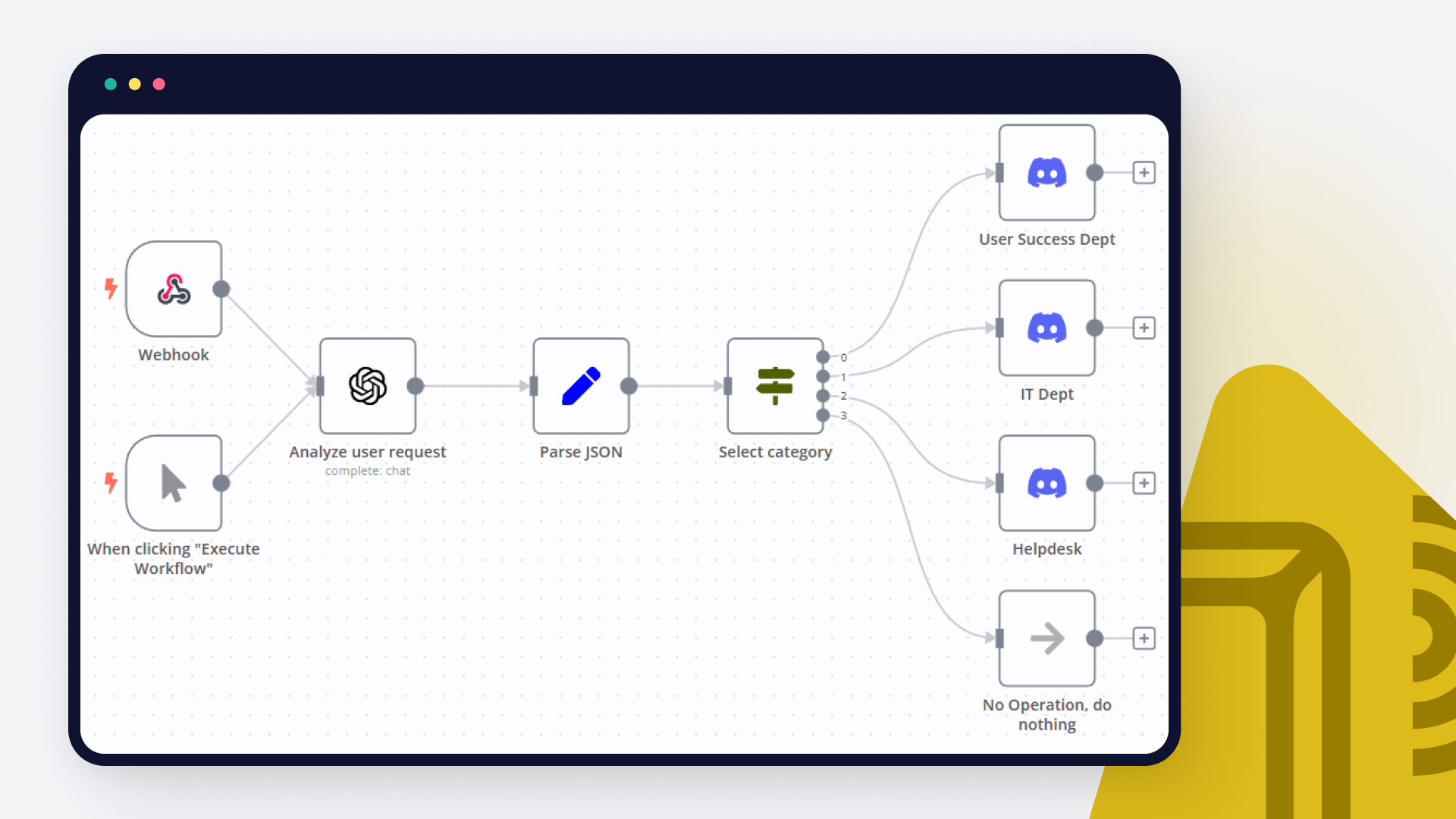
How to create a ChatGPT Discord bot
In this tutorial, we dive deep into how to create an AI bot for analyzing user requests and automating notifications in different Discord channels. Read on!
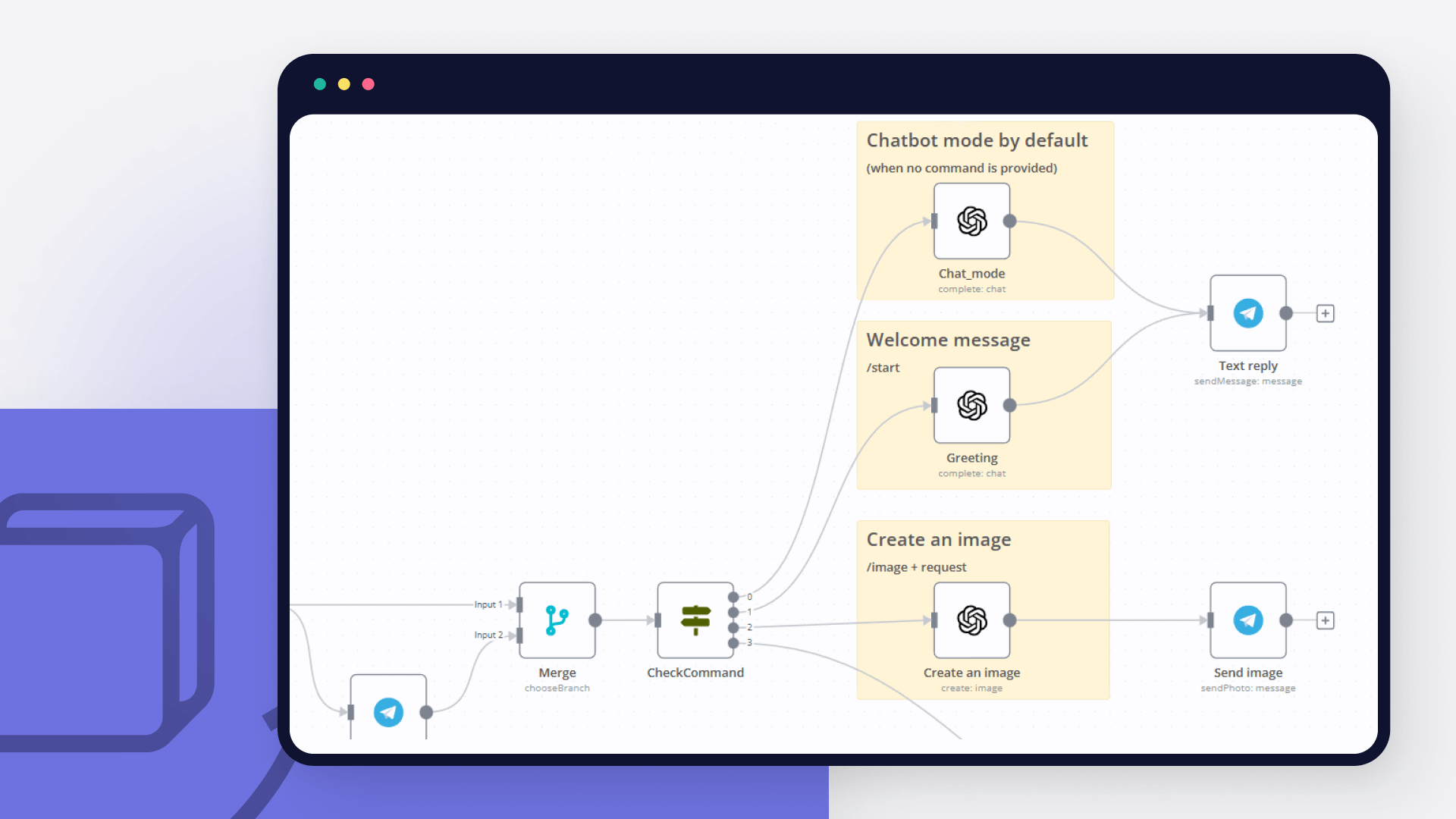
How to create an AI bot in Telegram
Learn how to create an AI chatbot for Telegram with our easy-to-follow guide. Ideal for users who are interested in exploring the realm of bot development without coding.

How to use OpenAI node with n8n to automate your workflows
Learn how to use OpenAI node together with n8n to automate your workflows – discover these 6 existing automation ideas!

How to get started with ChatGPT in your n8n projects: 5 simple workflows
Learn how to connect n8n with ChatGPT and effectively use this chatbot. Prompt engineering and prompt chaining is the trick!
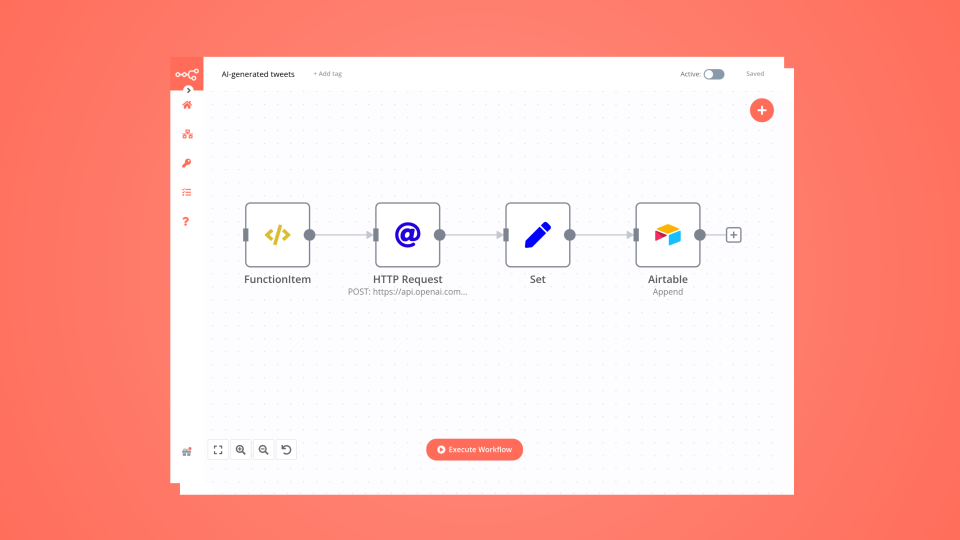
How to create an AI-driven tweet generator bot in 10 minutes
Lacking time or inspiration for your tweets? Then leverage OpenAI and n8n to generate tweets for you and store them in Airtable for further review.
FAQ
Can OpenAI connect with Trellix ePO?
Yes, OpenAI can connect with Trellix ePO using n8n.io. With n8n, you can create workflows that automate tasks and transfer data between OpenAI and Trellix ePO. Configure nodes for OpenAI and Trellix ePO in the n8n interface, specifying actions and triggers to set up their connection.
Can I use OpenAI’s API with n8n?
Yes, with n8n, you can programmatically interact with OpenAI’s API via pre-defined supported actions or raw HTTP requests. With the HTTP Request node, you create a REST API call. You need to understand basic API terminology and concepts.
Can I use Trellix ePO’s API with n8n?
Yes, with n8n, you can programmatically interact with Trellix ePO’s API via pre-defined supported actions or raw HTTP requests. With the HTTP Request node, you create a REST API call. You need to understand basic API terminology and concepts.
Is n8n secure for integrating OpenAI and Trellix ePO?
Yes, it is safe to use n8n to integrate OpenAI and Trellix ePO. n8n offers various features to ensure the safe handling of your data. These include encrypted data transfers, secure credential storage, RBAC functionality, and compliance with industry-standard security practices (SOC2 compliant). For hosted plans, data is stored within the EU on servers located in Frankfurt, Germany. You can also host it on your own infrastructure for added control.
Learn more about n8n’s security practices here.
How to get started with OpenAI and Trellix ePO integration in n8n.io?
To start integrating OpenAI and Trellix ePO in n8n, you have different options depending on how you intend to use it:
- n8n Cloud: hosted solution, no need to install anything.
- Self-host: recommended method for full-control or customized use cases.
Unlike other platforms that charge per operation, step, or task, n8n charges only for full workflow executions. This approach guarantees predictable costs and scalability, no matter the complexity or volume of your workflows.
Need help setting up your OpenAI and Trellix ePO integration?
Discover our latest community's recommendations and join the discussions about OpenAI and Trellix ePO integration.

How to define AI-powered Extra Workflow Inputs in AI tools?
Artem
Describe the question I need to pass to the tool some data from the AI Agent. Like, “task name” and “task tags” to create a task via Custom Workflow Tool. So I don’t know what to refer to in the Extra Inputs. Because th…
Open topic

The prompt is not being executed
sérgio eduardo floresta filho
Hello! My goal is to use Google Forms to collect information from my clients and then use n8n to automate the processing of this information. My workflow involves: Collecting data through Google Forms. Using n8n to re…
Open topic

OpenAI not receicving JSON data from previous node
Andrew adawdad
Describe the problem/error/question Im currently using the openAI node to send a text message to the system. I am sending the previous nodes JSON data, but the openai response says that im only sending {{ $json }} instea…
Open topic

Help with google sheets read node
PinkFloyd
Hi all, I am struggling with one part of my personal finance workflow where I want n8n to read a large table from Google Sheets and then feed all of it to an OpenAI node. I already set it up but can’t figure out how to f…
Open topic

New openAi Web search
Steve Warburton
Is this available to n8n ? As far as I can see it’s just ( for now ) ChatGPT
Open topic
Looking to integrate OpenAI and Trellix ePO in your company?
The world's most popular workflow automation platform for technical teams including









Why use n8n to integrate OpenAI with Trellix ePO
Build complex workflows, really fast