Back to Templates



Disclaimers
This workflow contains custom community nodes that requires local network version of n8n.
This analysis is for informational and educational purposes only and does not constitute financial advice, investment advice, or a recommendation to buy or sell any security. This model is based on historical, publicly available data and future projections are purely theoretical. Stock market investing involves substantial risk, including the loss of principal. All investment decisions are solely the responsibility of the user.
What It Does
Our powerful, proprietary workflow automates the most time-intensive component of investment research: fundamental stock analysis.
Data Acquisition & Modeling: Automatically extracts comprehensive historical and regulatory data from FinnHub and SEC filings. Proprietary code then cleans, structures, and calculates critical growth metrics, including Revenue and Net Income CAGR.
Predictive Valuation: The system applies robust models to these core financials, generating predictive price targets and precise estimated annualized returns over a multi-year horizon.
Generative AI Synthesis: The entire data package is processed by the advanced Gemini 2.5-Flash large language model. It synthesizes the metrics, growth projections, and valuation models into an in-depth fundamental narrative that concludes with a clear, actionable Buy/Sell/Hold rating.
This solution provides investors with rapid, objective, and institutional-grade analysis for smarter, data-driven investment decisions.
Who Is This For?
This platform is designed for data-driven investors and financial analysts who require rapid, objective, and institutional-grade fundamental analysis to make timely Buy/Sell/Hold decisions, without the manual effort of data compilation and calculation.
How It Works
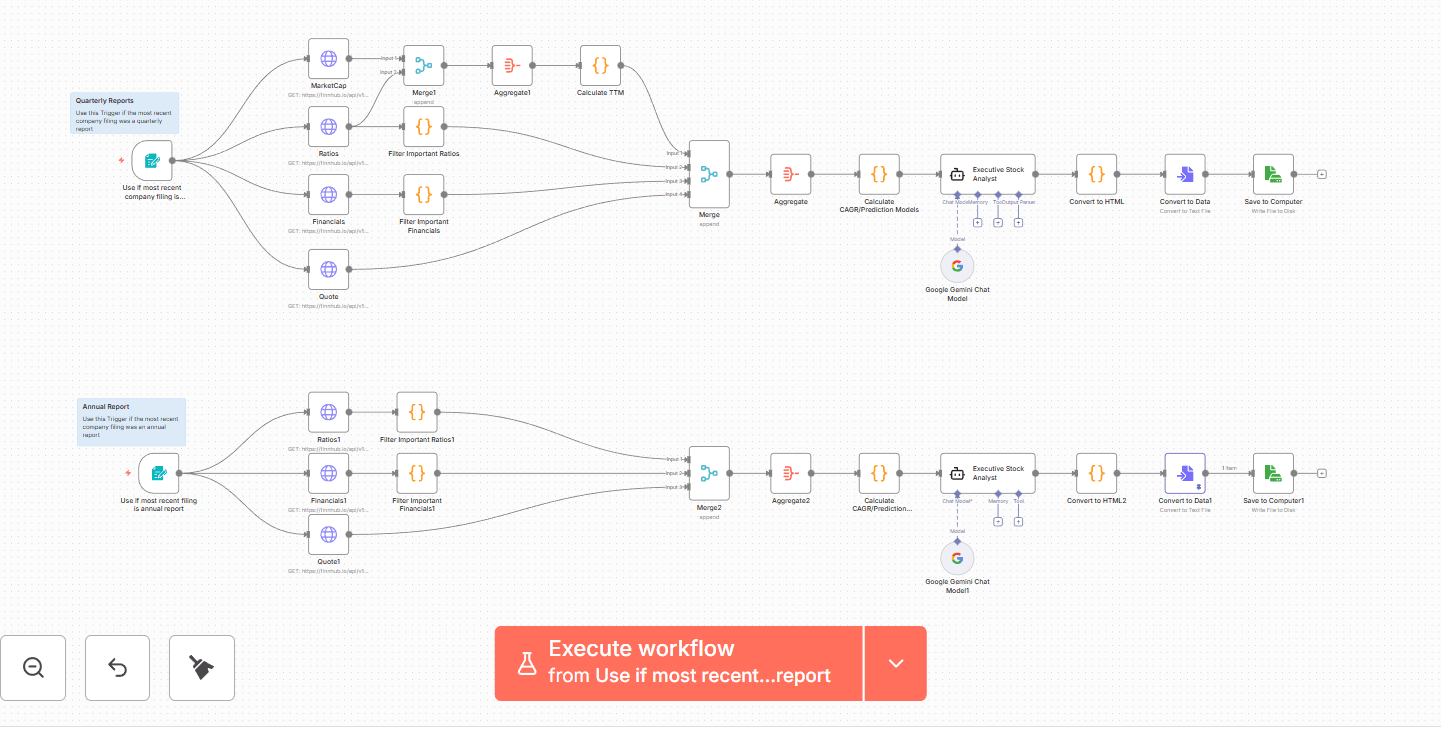
- Data Acquisition: The system initiates by securely extracting comprehensive historical financial data and regulatory filings from FinnHub using the target stock ticker.
- Data Modeling & Structuring: Proprietary code cleans and organizes the raw financial reports, ensuring consistency across all periods (e.g., converting currencies, handling nulls).
- Core Metric Calculation: The workflow automatically calculates vital long-term performance indicators, including the 1-Year, 3-Year, and 5-Year Compound Annual Growth Rate (CAGR) for both Revenue and Net Income.
- Predictive Valuation: Using the calculated 3-Year CAGR, the system generates multi-year future revenue and net income projections. It then applies conditional valuation based on profitability:
- P/E Model is used if TTM Net Income is positive.
- P/S Model is used if TTM Net Income is negative.
- Price Target Generation: Two independent, data-driven price targets are created for the future period: one using the stock's current multiple and a second using a Mapped Multiple (adjusted P/E or P/S) based on the calculated growth rates.
- Synthesis & Analysis (Gemini AI): The entire structured data package—including historical financials, CAGRs, and predictive price models—is fed into the Gemini 2.5-Flash engine.
- Actionable Reporting: Gemini performs a deep, qualitative fundamental analysis, synthesizing all quantitative metrics into a cohesive investment thesis and concluding with a clear, actionable Buy/Sell/Hold rating.
- Presentation & Archiving: The final Markdown report is converted to clean HTML and delivered for presentation, archiving, or direct viewing (via email or local file).
Set Up Steps
- You will need a FinnHub account and API key to connect to the Https Request Nodes. FinnHub is a free service.
- You will need a free Google AI studio account to obtain the API key for the AI agent nodes.
- Finally, create a folder on your computer you wish to have the summarizations saved to. Copy the pathway to this folder into the Save to Folder node.
- There is no cost to execute the workflow.