Back to Templates

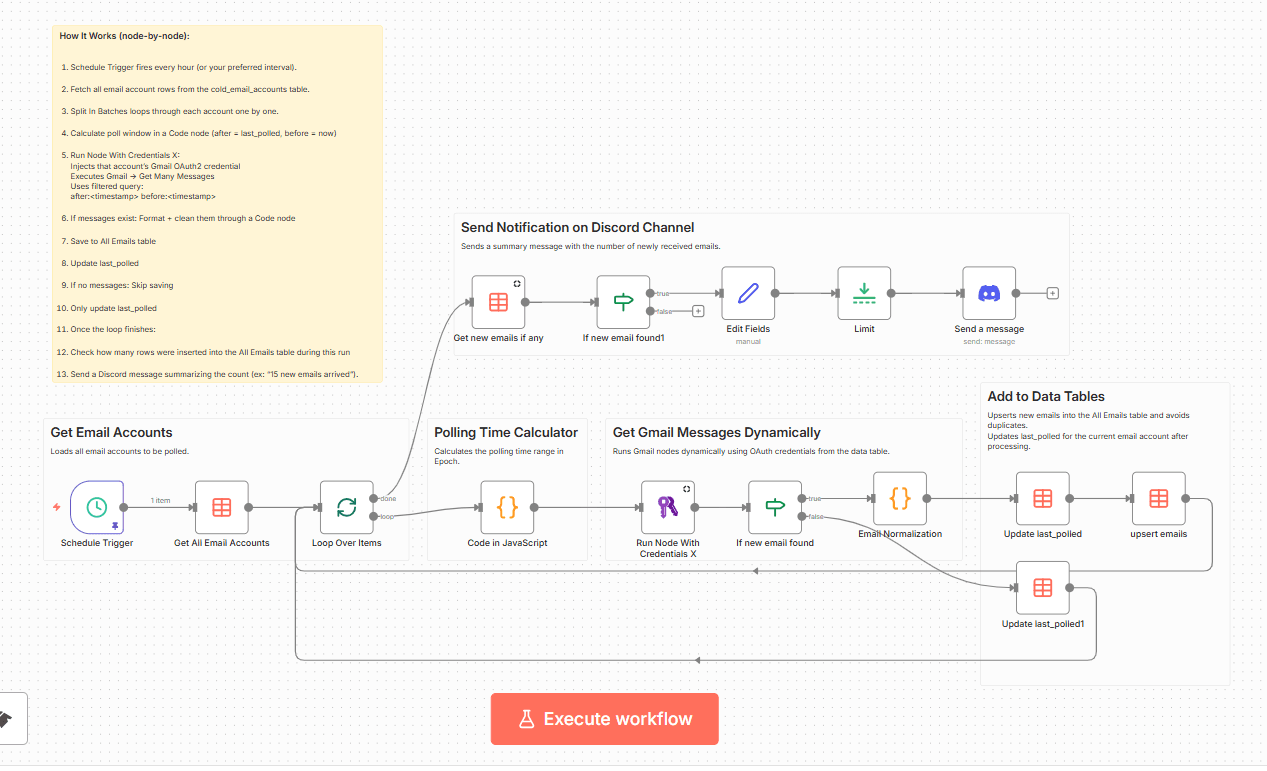
This template lets you poll multiple Gmail accounts from a single workflow using n8n’s credential-aware execution. Instead of creating separate workflows for every inbox, this setup loops through all accounts stored in your data table and runs Gmail operations dynamically using the correct OAuth2 credential.
It’s built for cases like cold-email systems, multi-client mail monitoring, or anything that needs centralized polling and logging.
### What It Does
-
Pulls all email account records from the cold_email_accounts table.
-
For every account, the workflow:
-
Runs the Gmail “Get Many Messages” node for that account using "Run Node With Credentials X" community node.
-
Messages are reformatted into a clean JSON object (from, subject, preview text, body, labels, attachments, etc.).
-
Saved into the All Emails table using an upsert (avoids duplicates).
-
Sends a Discord notification like “15 new emails arrived”.
### How to Set It Up
-
Create Gmail OAuth2 credentials in n8n, one for each email account you want to poll.
-
Add those credentials into a Data Table named cold_email_accounts with columns:
cred_id
credentials_name
email
last_polled (datetime) -
Import this workflow template into n8n.
-
Update:
DataTable references (if your names/IDs differ)
Discord channel/server IDs
Any domain filters inside the Gmail search query -
Activate the workflow and it will automatically:
Poll each Gmail inbox every hour
Save all new emails
Notify you on Discord
Keep everything synced via last_polled.